When thinking about how to use MyFXBook, often the first question is, do you have enough data to work with. Building up your own personal data of trading history means you have more intel to work with on how you can improve and reduce losing trades. In this article, I share how it works.
Why Every Trader Should Use MyFXBook
If you’re serious about improving your trading results, data is your greatest ally. MyFXBook is one of the most powerful tools available for traders who want to understand their performance on a deep level.
It goes beyond simple win rates or profit figures, offering an X-ray view of your trading habits, strengths, and weaknesses. Whether you trade forex, CFDs, indices, or commodities, MyFXBook lets you see exactly what’s working and what’s not, so you can refine your strategy for consistent long-term performance.
What is MyFXBook?
MyFXBook is an online analytical platform that connects directly with your trading account. It collects and analyzes your entire trade history, including closed trades, open trades, drawdowns, and even your trading behavior by day, hour, and symbol.
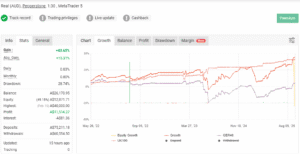
How to use MyFXBook
It’s like a personal performance coach that runs on your trading data, helping you identify patterns, mistakes, and opportunities that might otherwise go unnoticed.
Key MyFXBook Features
MyFXBook offers a broad range of tools designed for traders of all levels. Here are the most important ones you should know:
1. Portfolio Dashboard
The Portfolio dashboard is the heart of MyFXBook.
It lets you connect one or multiple brokerage accounts, so you can view all your trading data in one place. You can analyze performance by symbol, time of day, or even by the type of trade you placed (manual vs EA).
Key insights you’ll get:
-
Profit vs loss ratio by currency pair or instrument
-
Average trade duration and holding time
-
Best and worst trading hours or days
-
Average pips per trade
-
Win/loss consistency over time
You can also compare multiple accounts, for example, testing one strategy on demo vs live, or comparing two different EAs.
2. AutoTrade Copy System
If you’re interested in social trading or copying other traders, MyFXBook’s AutoTrade feature allows you to mirror trades from top-performing verified systems.
This is useful for both investors and traders testing strategy diversification.
3. Analytics & Advanced Statistics
MyFXBook tracks and visualizes over 100 different metrics from your account. Some of the most useful include:
-
Sharpe ratio (risk-adjusted return)
-
Drawdown percentage
-
Expectancy per trade
-
Lot sizing patterns
-
Profit factor
-
Daily/weekly/monthly returns
These metrics reveal whether your performance is sustainable, or whether you’re taking on too much risk for the return achieved.
4. Trade Verification
MyFXBook has a built-in verification system that proves your results are legitimate. When you link your account directly, it verifies trade data from your broker, confirming that the statistics displayed are authentic.
This makes it trusted by investors, prop firms, and trading communities, ideal if you’re managing funds or looking to build credibility.
5. Community & Discussion Forum
The MyFXBook community is large and active. You can view, follow, or discuss other traders’ systems, performance strategies, or risk setups.
This transparency gives traders perspective, seeing how others manage risk or structure their trade plans.
The Portfolio Tool by MyFXBook
The Portfolio Tool is one of the most valuable features within MyFXBook. It lets you connect your brokerage account, such as MetaTrader 4 (MT4), MetaTrader 5 (MT5), or cTrader, directly to the platform.
How It Works
You can connect your account using:
-
Publisher (uploading your statement file)
-
EA connection (automated synchronization)
-
Auto-update (recommended for simplicity)
Once connected, MyFXBook imports all historical data, not just the trades from when you linked it. This means you can analyze years of trading performance instantly.
Why It’s Powerful
Your trading history contains your behavioral patterns, how you react to wins, losses, volatility, and trends.
By reviewing this data, you can remove emotional bias and make decisions based on actual performance rather than memory or perception.
Trading History: Your Trading DNA
Think of your trading history as a blood test for your trading strategy. It reveals the true health of your system, showing where the strengths and weaknesses lie.
For example:
-
Which hours produce your best results?
-
Which days or symbols generate losses?
-
Do you tend to overtrade after losing trades?
-
Is your average win smaller than your average loss?
-
What is your true risk-to-reward ratio?
This kind of insight allows you to filter out unprofitable behaviors and reinforce successful ones.
Identifying Strengths
Using MyFXBook, you might find that your best trades occur in the London session, or that you perform better on trending pairs like GBPUSD. You can then focus your efforts there and increase position size or frequency where you’re strongest.
Identifying Weaknesses
Conversely, you might discover that Friday afternoon trades consistently lose or that trading reversals rarely works out for you.
These patterns help you eliminate weak areas from your plan, reducing unnecessary losses.
How to Use MyFXBook (Step-by-Step Guide)
Here’s how to set up and get started:
Step 1: Create a MyFXBook Account
Visit myfxbook.com and create a free account. Use your main trading email if possible for consistent account verification.
Step 2: Connect Your Broker Account
-
Go to Portfolio → Add Account
-
Select your platform (MT4, MT5, cTrader, etc.)
-
Choose your connection method (Auto Update or EA is best)
-
Enter your login credentials (or investor password for read-only access)
Once added, MyFXBook will begin syncing your trade data automatically.
Step 3: Verify Your Account
Verification ensures your results are authentic. MyFXBook checks your broker and confirms:
-
Broker name and server
-
Track record verified
-
Trading privileges verified
Once verified, your system can be made public or private depending on your preference.
Step 4: Analyze Your Data
Head to your Portfolio and explore:
-
Trading activity charts
-
Drawdown and equity curves
-
Best/worst trade lists
-
Daily and hourly analysis
-
Risk and exposure tables
These give you deep insight into where you perform best, and where to adjust.
Step 5: Optimize Your Trading Plan
Using this information, start filtering and optimizing your approach:
-
Focus on your best performing hours or symbols
-
Reduce trading during weak times
-
Adjust lot sizes or stop levels for better consistency
-
Use expectancy and drawdown to fine-tune risk management
Adapting Your Trade Plan with Hard Data
Trading improvement isn’t about random changes, it’s about data-driven refinement.
Using MyFXBook gives you the ability to back decisions with evidence.
Many traders stick to rigid plans, thinking consistency alone is key. But the most successful traders evolve their plans intelligently, using analytics to confirm what’s working.
For instance:
-
If your data shows you perform better on longer trades, extend your targets.
-
If your losing trades happen after overtrading, enforce a daily limit.
-
If your equity dips during news events, reduce exposure around those times.
This approach turns emotion into evidence, replacing guesswork with precision.
Advanced Tips for Using MyFXBook
-
Compare Multiple Accounts
Track separate strategies (scalping vs swing trading) to see which performs better. -
Use the Community Benchmarks
Compare your system metrics to top traders in your category. -
Export Data to Excel
For deeper analysis, export trade logs to CSV and build your own models. -
Monitor Risk Exposure
Use “Exposure” and “System Health” tabs to see if you’re over-leveraged. -
Stay Objective
Review your performance monthly, don’t react after every losing streak.
Benefits of Using MyFXBook for Long-Term Growth
-
Accountability – MyFXBook forces transparency with real data.
-
Confidence – Data-driven improvements reduce emotional swings.
-
Efficiency – Focus only on strategies and times that make money.
-
Learning Curve – Identify repeating mistakes and correct them early.
-
Community Insight – Learn from others and share your verified progress.
Common Mistakes to Avoid
-
Ignoring verification (reduces credibility)
-
Checking stats too often (leads to overreaction)
-
Comparing yourself unrealistically to others
-
Not filtering enough data (outliers can skew results)
-
Forgetting that statistics reflect behavior, not skill, improvement comes from acting on insights
Frequently Asked Questions
Q: Is MyFXBook free?
Yes, the standard MyFXBook analytics platform is free to use. Some additional features, such as AutoTrade, may involve performance-based costs.
Q: Can I connect multiple trading accounts?
Absolutely. You can connect multiple demo or live accounts under one dashboard.
Q: Is MyFXBook safe to use with my broker?
Yes. When connecting via investor password or read-only API, MyFXBook cannot place trades or withdraw funds. It only reads your trade data.
Q: Can I hide my account data?
Yes, you can make your account private or public with a toggle switch in your settings.
Q: Does MyFXBook work with all brokers?
Most major brokers using MT4, MT5, or cTrader are supported. For unsupported brokers, you can upload statements manually.
Data Is the Edge
In trading, what gets measured gets improved.
MyFXBook transforms trading from emotional guesswork into measurable progress.
By understanding your historical data, you can filter out weaknesses, amplify strengths, and trade with confidence.
If you’re not using MyFXBook yet, this is the missing edge in your journey toward consistent profitability.


0 Comments